

介绍
SEO关键词组合工具可以帮助你快速组合各种关键词。将要组合关键词输入到各区中,一次可以输入多个关键词。点击生成关键词,就能在几秒钟之内生成上千个关键词组合!
提高工作效率,使用方法很简单。
关键词组合工具组合方式
前缀(地区)+修饰语(品牌、型号、用途)+产品名称+后缀(价格、厂家、供应商、批发等);
公司名+产品名称
地区+产品名
型号+产品名
地区+型号+产品名
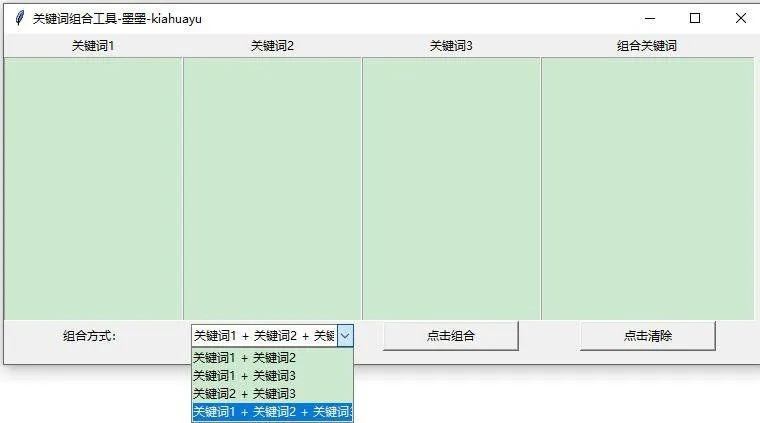
[Python]代码如下:
- import requests
- import json
- import tkinter as tk
- from tkinter import ttk
- import calendar
- from datetime import datetime
- import itertools
- from tkcalendar import DateEntry
- from tkinter.messagebox import showerror
- # 创建Tkinter的主窗口
- root = tk.Tk()
- root.title(“关键词组合工具-墨墨-kiahuayu”)
- root.geometry(‘760×330’)
- # 创建并放置文本框
- t = tk.Text(root, width=25, height=20)
- t.grid(row=1, column=0)
- t1 = tk.Text(root, width=25, height=20)
- t1.grid(row=1, column=1)
- t2 = tk.Text(root, width=25, height=20)
- t2.grid(row=1, column=2)
- t3 = tk.Text(root, width=30, height=20)
- t3.grid(row=1, column=3)
- # 创建标签
- tk.Label(root, text=”关键词1″, width=15).grid(row=0, column=0)
- tk.Label(root, text=”关键词2″, width=15).grid(row=0, column=1)
- tk.Label(root, text=”关键词3″, width=15).grid(row=0, column=2)
- tk.Label(root, text=”组合关键词”, width=15).grid(row=0, column=3)
- # 组合方式选择框
- ttk.Label(root, text=”组合方式:”).grid(row=2, column=0)
- combo = ttk.Combobox(root, values=[
- “关键词1 + 关键词2”,
- “关键词1 + 关键词3”,
- “关键词2 + 关键词3”,
- “关键词1 + 关键词2 + 关键词3”
- ], state=”readonly”, width=20)
- combo.grid(row=2, column=1, padx=5)
- combo.current(3) # 默认选择全组合
- ls = []
- def on_date_selected():
- # 清空结果
- ls.clear()
- t3.delete(‘1.0’, tk.END)
- # 获取文本框内容
- contents = [
- t.get(“1.0”, tk.END).split(‘\n’),
- t1.get(“1.0”, tk.END).split(‘\n’),
- t2.get(“1.0”, tk.END).split(‘\n’)
- ]
- # 清洗和过滤空内容
- lines_list = [
- [line.strip() for line in content if line.strip()]
- for content in contents
- ]
- # 获取组合方式
- combination_map = {
- “关键词1 + 关键词2”: [0, 1],
- “关键词1 + 关键词3”: [0, 2],
- “关键词2 + 关键词3”: [1, 2],
- “关键词1 + 关键词2 + 关键词3”: [0, 1, 2]
- }
- selected = combo.get()
- indices = combination_map.get(selected, [0, 1, 2])
- # 生成组合
- try:
- for parts in itertools.product(*[lines_list[i] for i in indices]):
- combined = ”.join(parts)
- ls.append(combined)
- t3.insert(‘end’, combined + ‘\n’)
- except IndexError:
- showerror(“错误”, “无效的组合选项”)
- def clear_text():
- for widget in [t, t1, t2, t3]:
- widget.delete(‘1.0’, ‘end’)
- def paste_text(text_widget):
- text_widget.event_generate(‘<<Paste>>’)
- def copy_text(widget):
- try:
- text = widget.selection_get()
- root.clipboard_clear()
- root.clipboard_append(text)
- except tk.TclError:
- showerror(“错误”, “没有选中的内容”)
- # 右键菜单功能
- def create_menu(text_widget, event):
- menu = tk.Menu(text_widget, tearoff=False)
- menu.add_command(label=’粘贴’, command=lambda: paste_text(text_widget))
- menu.add_command(label=’复制’, command=lambda: copy_text(text_widget))
- menu.tk_popup(event.x_root, event.y_root)
- # 绑定右键菜单
- for widget in [t, t1, t2, t3]:
- widget.bind(‘<Button-3>’, lambda event, w=widget: create_menu(w, event))
- # 操作按钮
- tk.Button(root, text=”点击组合”, command=on_date_selected, width=18).grid(row=2, column=2)
- tk.Button(root, text=”点击清除”, command=clear_text, width=18).grid(row=2, column=3)
- root.mainloop()
复制代码
声明:本站所有文章,如无特殊说明或标注,均为本站原创发布。任何个人或组织,在未征得本站同意时,禁止复制、盗用、采集、发布本站内容到任何网站、书籍等各类媒体平台。如若本站内容侵犯了原著者的合法权益,可联系我们进行处理。
